

In our daily lives, there are many ways to obtain 4K MP4 videos, such as shooting them with cameras or smartphones, or downloading them from video websites. However, 4K technology brings real-world challenges. The sheer size and processing demands of 4K videos often overwhelm older devices and software, causing slow performance, laggy playback, and even crashes. Many 4K MP4 videos cannot be played on common electronic devices, nor can they be imported into lower-version editing software. Sony camera footage is a particular nightmare for many users. Additionally, 4K files are notorious space hogs, and 4K displays are not yet universal. These problems push many users to compress and convert 4K MP4 videos to 1080p H.265 MP4. This article will share some practical applications to help you solve this problem.
That’s where a reliable 4K to 1080p converter comes in. But why specifically downscale 4K MP4 video to 1080p H.265 MP4? The answer lies in H.265 (HEVC) technology: compared to H.264, H.265 offers roughly 50% better compression while maintaining the same visual quality. By converting your 4K MP4 to a 1080p H.265 MP4, you dramatically reduce file size and hardware requirements, yet keep excellent sharpness—perfect for smooth playback, faster uploads, and efficient storage.
Below are five proven methods to compress 4K MP4 to 1080p MP4 using H.265, including offline software, free tools, and online solutions.
1. Acrok Video Converter Ultimate – Best Overall 4K to 1080p Converter
Acrok Video Converter Ultimate is a top-tier choice for anyone looking to downscale 4K MP4 video to 1080p H.265 MP4. It simplifies conversion to 1080p, 720p, or 480p while preserving outstanding quality. The software supports a vast range of formats (MP4, MOV, MKV, HEVC, H.264, VP9, etc.) and leverages Intel, NVIDIA, and AMD GPU hardware acceleration to offload heavy 4K processing from your CPU—preventing crashes and delivering a seamless experience even on modest laptops.
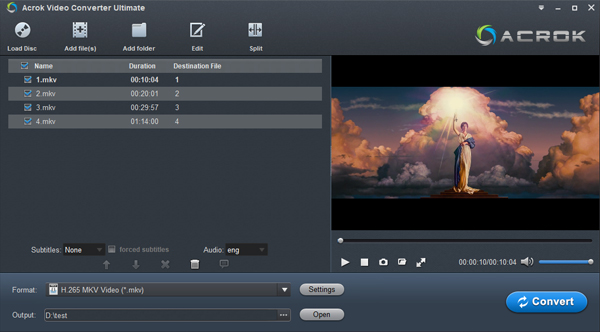
Key features:
- Downscale 4K to 1080p while reducing file size by up to 90%
- Edit, cut, crop, merge, or lower bitrate/frame rate (e.g., 4K 60fps → 1080p 30fps)
- H.265 (HEVC) output with visually lossless quality
- Rip and convert 4K Blu-ray to 4K/1080P MP4 for playing
- Transcode 4K MP4 to ProRes, DNxHD AIC, MPEG codec for editing
How to convert 4K MP4 to 1080p H.265 MP4 with Acrok:
- Launch Acrok and click “Add File” to import your 4K MP4.
- Click the “Format” bar, choose MP4, then select H.265 codec.
- Click “Convert” – your downscaled 4K MP4 video to 1080p H.265 MP4 will be ready in minutes.
✅ Fast, hardware-accelerated, and beginner-friendly.
2. VLC Media Player – Free and Cross-Platform
VLC is famous as a media player, but it also functions as a free 4K to 1080p converter. It can downscale 4K to 1080p without watermarks and works on Windows, macOS, Linux, iOS, and Android. However, be aware that VLC’s 4K conversion speed is relatively slow compared to dedicated software, and customization options are limited.

How to downscale 4K to 1080p using VLC:
- Open VLC, go to Media > Convert/Save.
- Click Add to load your 4K MP4 file, then click Convert/Save.
- Under Profile, choose an H.265/MP4 option if available (or H.264, then remux later).
- Click the wrench icon, go to Video Codec tab, set Resolution to 1920×1080.
- Choose a destination and click Start.
✅ Completely free, no watermarks, and runs on almost any device.
3. HandBrake – Powerful Open-Source Converter
HandBrake is a robust, open-source video transcoder that excels at compressing 4K MP4 to 1080p MP4 using H.265. It supports all major input formats (MP4, MKV, AVI, etc.) and offers granular controls: bitrate, frame rate, filters, and more. The interface can be intimidating for beginners, and conversion speed may be slow on older hardware—but the results are top-notch.
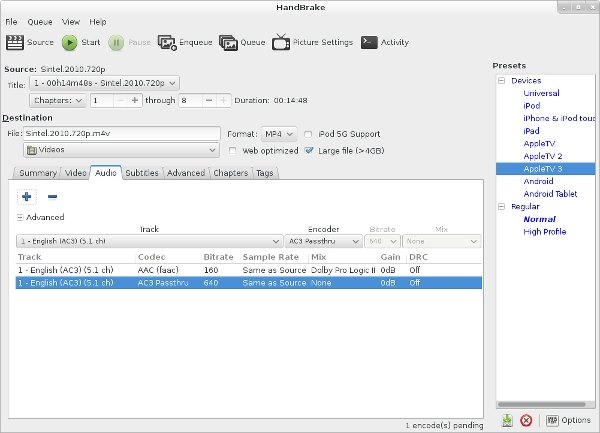
How to compress 4K MP4 to 1080p H.265 MP4 with HandBrake:
- Launch HandBrake and click File to load your 4K video.
- Under the Summary tab, set output format to MP4.
- Go to the Video tab, select H.265 (x265) as the encoder.
- In the Dimensions tab, set width to 1920 and height to 1080.
- Click Start Encode.
✅ Free, open-source, and extremely customizable – ideal for power users.
4. Happy Scribe – Online AI-Powered Converter
Happy Scribe is primarily known for transcription, but its online video conversion tool lets you convert 4K to 1080p online quickly and easily. You don’t need to install any software; everything runs in the cloud. HappyScribe supports H.265 output and automatically optimizes file sizes. The free tier has limitations (file size caps, watermarks, or lower resolution), and you’ll need a premium plan (starting at around $10–15/month) to downscale 4K MP4 video to 1080p H.265 MP4 without restrictions.

How to convert 4K to 1080p online with HappyScribe:
- Go to HappyScribe’s video conversion page.
- Upload your 4K MP4 file (drag & drop or click to select).
- Choose output format MP4 and video codec H.265.
- Select resolution 1920×1080 (Full HD).
- Click “Convert” and download your file when ready.
✅ No installation, cloud-based, good for occasional online use.
5. Pinnacle Studio – Professional Desktop Editor
Pinnacle Studio is a full-featured video editing suite that also excels at exporting and downscaling 4K MP4 video to 1080p H.265 MP4. Unlike simple online tools, Pinnacle Studio gives you timeline editing, color grading, and precise control over export parameters. It’s not free, but the one-time purchase (or subscription) is worth it for content creators who need both editing and high-quality compression.

How to compress 4K MP4 to 1080p MP4 with Pinnacle Studio:
- Open Pinnacle Studio and import your 4K MP4 clip.
- Drag it to the timeline.
- Click Export or Share.
- Choose MP4 as container, H.265 as codec.
- Under resolution, select 1920×1080.
- Adjust bitrate as needed, then click Export.
✅ Professional-grade control, ideal for editing + conversion in one workflow.
Comparison Table: Which Method Should You Choose?
| Tool | Price | Offline? | H.265 Support | Speed | Ease of Use |
|---|---|---|---|---|---|
| Acrok | Paid | ✅ Yes | ✅ Excellent | Very fast (GPU) | Very easy |
| VLC | Free | ✅ Yes | Limited | Slow | Moderate |
| HandBrake | Free | ✅ Yes | ✅ Full | Moderate | Complex |
| HappyScribe | Freemium | ❌ No | ✅ Yes | Fast (cloud) | Very easy |
| Pinnacle Studio | Paid | ✅ Yes | ✅ Full | Fast | Moderate (pro) |
FAQs about Downscaling 4K to 1080p H.265 MP4
1. Why convert 4K MP4 to 1080p H.265 MP4 instead of H.264?
H.265 (HEVC) offers roughly twice the compression efficiency of H.264. A 1080p H.265 file can be half the size of an H.264 file with identical visual quality. This means faster uploads, more storage savings, and smoother playback on modern devices.
2. Can I convert 4K to 1080p online for free?
Yes, tools like HappyScribe offer free online conversion, but free tiers typically limit file size (e.g., ≤500MB), add watermarks, or restrict output resolution to 720p. For true 1080p H.265 output, a premium plan is usually required.
3. Will I lose quality when I downscale 4K to 1080p?
Downscaling from 4K to 1080p actually averages four pixels into one, which can reduce noise and produce a cleaner image. When using a good 4K to 1080p converter with H.265 encoding, the visual loss is negligible to the human eye, while file size drops dramatically.
4. How much space can I save by converting 4K to 1080p H.265?
A typical 1-minute 4K@30fps H.264 file might be ~170MB. After downscaling to 1080p H.265, the same video can be as small as 20-30MB – an 85% reduction.
5. Can I compress 4K MP4 to 1080p MP4 in batches?
Yes. Acrok, HandBrake, and Pinnacle Studio all support batch processing. This is extremely useful if you have many 4K files to downscale 4K MP4 video to 1080p H.265 MP4 at once.
6. What’s the difference between downscaling and compressing?
Downscaling specifically reduces resolution (4K → 1080p). Compressing can also include lowering bitrate, changing codec (e.g., to H.265), or both. The methods above do both to achieve the smallest file size with good quality.
Final Thoughts
Whether you need to free up disk space, enable smooth editing, or share videos faster, learning to downscale 4K MP4 video to 1080p H.265 MP4 is an essential skill. From the powerful offline capabilities of Acrok and HandBrake to the free simplicity of VLC, plus online convenience with HappyScribe and professional editing with Pinnacle Studio, you have a proven solution for every workflow. Now you can confidently compress 4K MP4 to 1080p MP4 using H.265 – and enjoy smaller, more compatible, yet stunningly sharp videos.

No responses yet